Hermiq skills tutorial series — Part 4: Skills that learn
Close the loop. Read the learnings a skill captures from its own runs, review a self-proposed improvement draft with diff and provenance, roll a version back, and republish to GitHub when the published copy falls behind. Part 4 of 4.

A self-improving skill sounds like a skill that edits itself. In Hermiq it is the
opposite: every improvement is a draft that must survive a content scan, an eval
gate, and your explicit approval before it becomes a new version. In this final part
you read the learnings the seeded tender-summary skill has captured, review its
pending improvement draft, decide it, and learn the version history, rollback, and
republish surfaces that keep the whole loop reversible.
Step 1: Read a skill's learnings
Open the tender-summary detail page and its Learnings card. The seed ships with
demo content so you can see the shape before any real run has happened.
Two files live in the skill's own files map, so they travel with every export:
learning-candidates.mdis the inbox. After a run in which the skill's content was actually loaded, a background capture pass extracts short, dated observations from the run trace and appends them here. Each candidate carries its date, a target section, and the ids of the runs that produced it.learnings.mdis the promoted knowledge, in five fixed sections: Patterns That Work, Mistakes to Avoid, Domain Knowledge, Open Questions, and Consolidated Principles.
The Learnings card renders learnings.md read-only, with the candidate count and the
last capture and promotion timestamps. There is no edit button, on purpose: no user,
and no agent, writes learnings directly.
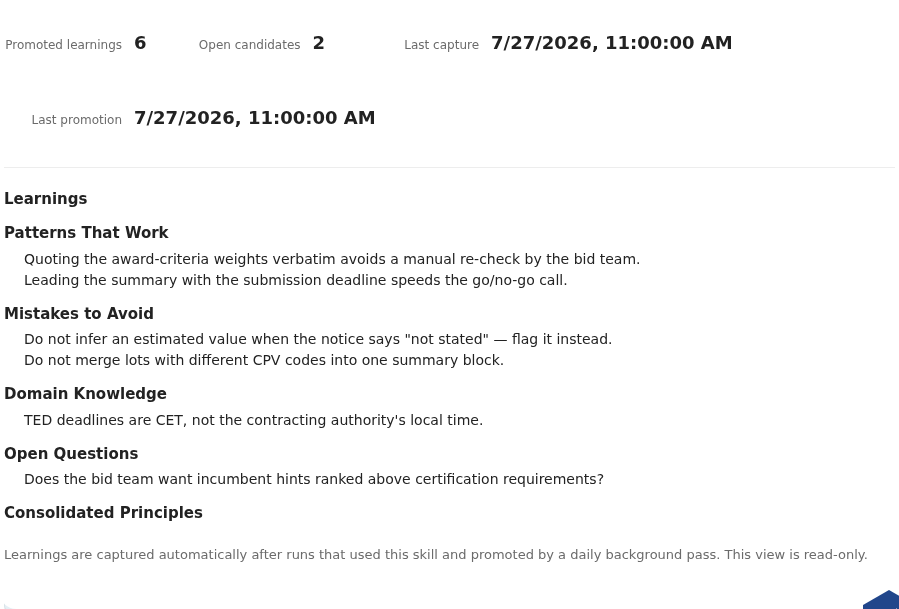
tender-summary: the activity strip on top, the five fixed sections below, and no edit affordance anywhere — capture and promotion are the only writers.Verify: the Learnings card shows populated sections and an activity strip, and offers no edit affordance.
Step 2: Understand what gets captured, and what never does
The loop is deliberately narrow. Worth knowing before you trust it:
- No utilization, no credit. Capture is driven by the run's record of which skills were actually loaded into context. An installed but unused skill gets nothing from that run.
- Capture never blocks a run. It runs queued, after the run's outcome is persisted. A capture failure is logged and changes nothing about the run.
- Everything is redacted first. Observations pass the same secret and PII redaction as agent memory. An observation that redacts to empty is dropped.
- Promotion is mechanical, daily, and LLM-free. A candidate confirmed in three distinct runs is promoted into its section. A candidate that explains a failed eval case is promoted immediately. A candidate untouched for thirty days expires.
- Promotion alone never grants L6. The scorecard keeps L6 failed until consolidation has happened, which is exactly what the draft flow below does.
Verify: on the maturity scorecard from Part 2, tender-summary still reports L6
failed with a reason naming missing consolidation, despite its populated learnings.
Step 3: Review the pending improvement draft
Accumulated learnings eventually earn a proposal: a background consolidation task
drafts a new skill version from learnings.md. Three triggers exist: a learnings
threshold (20 entries by default), a failed eval regression on a linked dataset, or a
manual propose-improvement action. Only one draft can be open per skill at a time.
Before you ever see a draft, it has passed two gates:
- Content scan. The proposed frontmatter, body, and all files are scanned, with
learnings.mdtreated as instruction content, because it is injected into agent context. A dangerous verdict discards the draft with no override, stricter than the install path. If the scanner is unavailable, the draft waits; it never skips ahead unscanned. - Eval gate. When the skill is linked to a dataset (Part 3), a paired draft-versus-active eval runs with everything else frozen. A draft that scores strictly worse than the active version is auto-discarded, with both pass rates in the audit note. A skill with no linked dataset still produces a reviewable draft, flagged as having no eval evidence.
The seed ships tender-summary with one draft already in review, so open its detail
page. The review card shows everything the decision needs:
- A side-by-side diff of proposed versus active content.
- The provenance: the driving learnings entries, the trigger, and the pinned base version the draft diffs against.
- The scan verdict and the eval delta, or the explicit no-eval-evidence flag. The seeded draft carries this flag, so you practise deciding without eval evidence.
Verify: the review card renders diff, provenance, a clean scan verdict, and the no-eval-evidence flag, with Accept, Edit, then accept, and Reject available.
Step 4: Decide the draft
Three decisions exist, all behind the skill.review-draft action:
- Accept applies the proposed content onto the skill as a new version through the normal versioned write path, and stamps the skill's last-accepted timestamp.
- Edit, then accept lets you modify the proposal first. Your edit is recorded, and it invalidates the prior scan and eval results: pre-qualification re-runs over your edited content before the draft can be approved from anywhere. The accepted version is recorded under your name, not the agent's.
- Reject closes the draft. You can mark specific driving learnings as bad; marked entries are excluded from driving the next proposal.
A workable default: read the diff first. Accept when the eval delta is neutral or better and the driving learnings look right. Reject otherwise, and mark the bad learnings so the next proposal skips them. For the seeded draft, either decision exercises the real path. The decision also flows through Hermiq's generic approval inbox: every draft in review has a linked Approval carrying a deep link and the full evidence, so an approver can decide from the inbox without opening the skill. Every transition lands in the audit trail.
After acceptance, one more safety net arms itself: if the next eval run for the skill's linked dataset regresses, the skill detail page shows an advisory rollback suggestion and notifies whoever accepted. Advisory means advisory; nothing rolls back by itself.
Verify: after accepting, the draft shows as accepted, the skill's content matches the proposal, and the version history (next step) has gained an entry.
Step 5: Walk the version history, then roll back
Every accepted draft, every edit, every rollback is a version. The history is the skill's audit trail, newest first, each entry with a version id, timestamp, and acting user.
- On the
tender-summarydetail page, open the version history. - Pick the version from before your acceptance and view the diff: it covers frontmatter, body, and files, and nothing else. Lifecycle state, maturity evidence, and provenance are not versioned content.
- Roll back to it. Rollback writes the old content as a new version; history is append-only, and nothing is deleted.
- Check what stayed put: state, maturity level and evidence, GitHub provenance, and installations all keep their current values.
Runs pin the exact skill versions they executed with, so even after a rollback you can trace any past run to the content that shaped it.
Verify: after the rollback the skill's body matches the older version, and the history shows one more entry, not one fewer.
Step 6: Republish when the published copy is behind
A skill published to GitHub carries its provenance: owner, repository, and the timestamp of the last publish. When you accept a draft on such a skill, the accepted version postdates the published one, and Hermiq raises the signal:
- A "Published copy is behind" badge on the catalog row and the detail page.
- One notification to the publisher per newly-behind transition.
- A one-click Republish action, behind the same publish authorization as the original publish.
Republish pushes the current version to the skill's own repository and restamps the
publish timestamp, clearing the badge. Two things it never does: it never runs
automatically, and it never ships learning-candidates.md. The promoted
learnings.md travels with the published skill; the raw candidate inbox stays home.
The seeded skills carry no GitHub provenance, so on a tutorial instance you read this surface rather than click it. Publish any skill to GitHub through the catalog's publish flow and the badge behaviour is live from then on.
Verify: on a skill with GitHub provenance, accepting a draft shows the behind badge, and Republish clears it.
What you get
The full loop, with a human at every gate: runs produce candidates, promotion turns confirmed candidates into learnings, consolidation proposes a draft, the scan and the eval gate filter it, you decide it, versions make it reversible, and republish is a deliberate act. In Hermiq a self-improving skill proposes its own next version, and a person approves every version that ships.
Test yourself
Question 1: A draft's paired eval scores exactly equal to the active version. What happens to it?
Hint
Only strictly worse is auto-discarded.
Answer
It survives to human review. Auto-discard requires a strictly lower pass rate than the active version. An equal score is a judgement call, and judgement calls belong to the reviewer, who sees both pass rates on the review card.
Question 2: Why does editing a draft before accepting invalidate its scan and eval results?
Hint
What did the gates actually check?
Answer
The gates checked the proposed content as it was. Your edit produces different content, and an approval from any surface (including the generic inbox) would otherwise apply an unscanned, unmeasured body. So pre-qualification re-runs over the edited content, and the Approval stays undecidable until it passes.
Where to go from here
That closes the series: catalog and authoring, the maturity ladder, paired measurement, and the gated learning loop. The natural next read is the series where the same maturity model runs in the development workflow.