Publish and harvest a catalog with DCAT-AP
Scope a catalog to your DCAT register, publish with one date field, and expose it as a DCAT-AP-NL feed that data.overheid.nl can harvest.

This is Part 3 of the Woo tutorial series. Start with Set up Woo and DCAT registers and Upload files to a Woo publication.
In Part 1 you imported a DCAT register for open data. In this tutorial you make its datasets findable: you scope a catalog to the register, set one date field that controls visibility, and expose the catalog as a DCAT-AP-NL feed. National portals like data.overheid.nl harvest that feed.
How publishing works in OpenCatalogi
OpenCatalogi has no separate "publish" button. Visibility is a rule on the schema, enforced by OpenRegister:
Anyone (the
publicgroup) may read a dataset when itspublicatiedatumis now or earlier.
So three things decide whether an anonymous visitor sees a dataset:
- The dataset lives in a register and schema that a catalog points at.
- The dataset has a
publicatiedatumthat is now or earlier. - The visitor reads it through a public endpoint.
The next steps set up all three.
Step 1: Create a dataset
Open OpenRegister → Data → Registers, open your DCAT register, and open the Dataset schema. Click Add object and fill in a title, a description, a few tags, a category (the DCAT theme), and a publicatiedatum in the past, for example 2026-03-01 00:00:00. Save.
You now have a dataset. OpenRegister shows it with its register, schema, and dates.
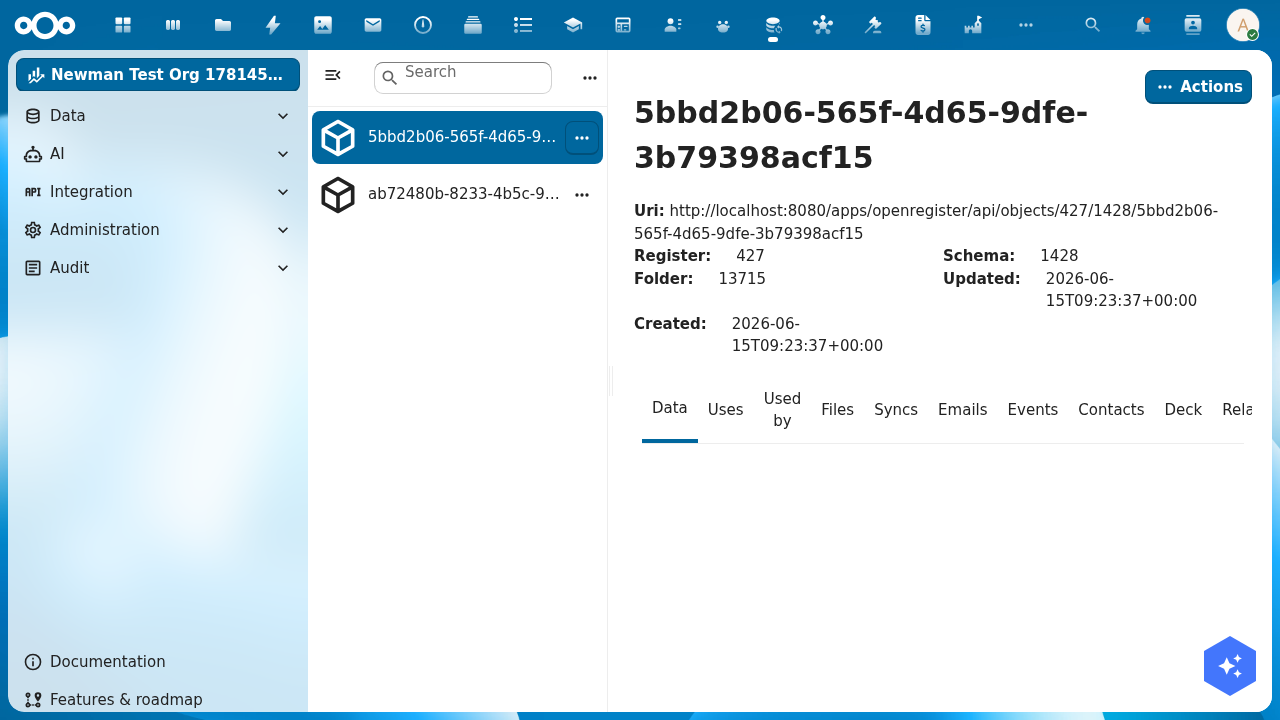
To see the visibility rule at work, add a second dataset with a publicatiedatum in the future, for example 2099-01-01. It stays hidden from the public until that date.
Step 2: Scope a catalog to your register
OpenCatalogi ships one catalog with the slug publications. By default its scope is empty, so it serves nothing. Point it at your DCAT register.
In OpenCatalogi, open Catalogue → Catalogs, open the Publications catalog, and set its Registers to your DCAT register and its Schemas to the Dataset schema. Save. The catalog now knows which objects belong to it.
Step 3: Verify public search
Read the catalog as an anonymous visitor. Open the public publications endpoint, using the catalog slug, with no login:
https://your-host/index.php/apps/opencatalogi/api/publications
You see only the published dataset. The future-dated one is gone:
{
  "results": [
    {
      "title": "Energielabels per adres 2026",
      "description": "Voorlopige energielabels gekoppeld aan BAG-adressen.",
      "tags": ["energie", "bag", "wonen"],
      "category": "Economy and finance",
      "license": "CC0-1.0",
      "publicatiedatum": "2026-03-01 00:00:00",
      "status": "Published",
      "@self": {
        "id": "5bbd2b06-565f-4d65-9dfe-3b79398acf15",
        "register": "427",
        "schema": "1428",
        "owner": "admin"
      }
    }
  ],
  "total": 1,
  "page": 1,
  "pages": 1
}
The future-dated "Nog niet openbare dataset" (publicatiedatum in 2099) is
absent: OpenRegister filters it in SQL, so it never reaches the public
response. Open the same register in OpenRegister as an admin and you see
both datasets — the difference is exactly your unpublished datasets.
A dataset with an empty publicatiedatum is not public. The rule needs a date that is now or earlier. If a dataset does not appear in public search, check its publicatiedatum first.
Step 4: Expose the catalog as a DCAT-AP-NL feed
DCAT-AP-NL is the exchange format for Dutch open data. data.overheid.nl and data.europa.eu harvest it. OpenCatalogi renders your published datasets as a DCAT catalog, with each dataset as a dcat:Dataset and its files as dcat:Distribution. No extra storage, no new schema.
Open the instance feed, anonymously:
https://your-host/index.php/apps/opencatalogi/api/dcat
You get a JSON-LD document with the DCAT-AP-NL profile
(data.overheid.nl/dcat-ap-nl/3.0). Each published dataset becomes a
dcat:Dataset and each attached file a dcat:Distribution:
{
  "@context": {
    "dcat": "http://www.w3.org/ns/dcat#",
    "dct": "http://purl.org/dc/terms/",
    "profile": "https://data.overheid.nl/dcat-ap-nl/3.0"
  },
  "@graph": [
    {
      "@id": "https://your-host/index.php/apps/opencatalogi/api/dcat",
      "@type": "dcat:Catalog",
      "dct:title": "OpenCatalogi",
      "dcat:dataset": [{ "@id": "https://your-host/.../objects/427/1428/5bbd2b06" }]
    },
    {
      "@id": "https://your-host/.../objects/427/1428/5bbd2b06",
      "@type": "dcat:Dataset",
      "dct:title": "Energielabels per adres 2026",
      "dct:description": "Voorlopige energielabels gekoppeld aan BAG-adressen.",
      "dcat:keyword": ["energie", "bag", "wonen"],
      "dcat:theme": { "@id": "http://publications.europa.eu/resource/authority/data-theme/ECON" },
      "dct:license": "CC0-1.0",
      "dct:modified": "2026-03-01",
      "dct:identifier": "5bbd2b06-565f-4d65-9dfe-3b79398acf15",
      "dcat:landingPage": { "@id": "https://your-host/.../objects/427/1428/5bbd2b06" },
      "dcat:distribution": [
        {
          "@type": "dcat:Distribution",
          "dct:title": "energielabels-2026.csv",
          "dcat:downloadURL": { "@id": "https://your-host/.../files/energielabels-2026.csv" },
          "dcat:mediaType": "text/csv",
          "dct:format": { "@id": "http://publications.europa.eu/resource/authority/file-type/CSV" }
        }
      ]
    }
  ]
}
To publish a single catalog as its own harvestable feed, turn on DCAT on the catalog and read its per-catalog endpoint at /api/catalogs/publications/dcat. The per-catalog feed lists your published datasets as dcat:Dataset nodes and honours the same visibility rule as Step 3.
The per-catalog /dcat endpoint ships with OpenCatalogi 1.1 and later. On older builds, use the instance feed at /api/dcat.
Test yourself
You added a dataset but it does not show in public search. What do you check first?
Its publicatiedatum. The public read rule only matches datasets with a date that is now or earlier. An empty or future date hides the dataset from anonymous visitors, by design.
Why does the catalog need a registers and schemas scope?
The catalog is a filter. Its registers and schemas tell OpenCatalogi which objects belong to it. An empty scope serves nothing, even when datasets exist.
What does a national portal like data.overheid.nl read, the search API or the DCAT feed?
The DCAT feed. /api/dcat and the per-catalog /dcat endpoint render your datasets as DCAT-AP-NL, the format harvesters expect. The search API is for people and applications.
Where to go from here
Your catalog is public and harvestable. So far you have entered datasets by hand. In a real deployment they come from another system: a case-management API, an open-data source, an existing register.
Part 4 of this series sets up that flow with Integriq.