Hermiq skills tutorial series — Part 3: Measuring skills with paired evals
Prove a skill earns its place. Link an eval dataset to a skill, run a paired with/without baseline through the real engine, read pass rate and baseline delta, and watch L5 evidence land on the scorecard. Part 3 of 4.

A skill that "feels right" can still add nothing, or make the agent worse. Paired
evals answer the question with two runs of the same cases: one with the skill, one
without. In this part you use the seeded woo-triage-paired-eval dataset to run a
paired baseline against woo-request-triage, read the delta, and watch the L5
evidence appear where Part 2 left a named gap.
How a paired eval works
An EvalDataset is a named set of cases. Each case is a prompt plus an expectation:
| Expectation type | Passes when |
|---|---|
contains | The output contains the expected substring |
notContains | The output does not contain the substring |
jsonPathEquals | The output parses as JSON and the value at the path matches |
rubric | An LLM judge scores the output at or above the case's threshold |
A plain run executes every case once through the agent's real engine path: same impersonation, same model, same tools as a scheduled run. Nothing is delivered to Talk or notifications; results land only on the run record.
A paired run executes everything twice. The with-half exposes the agent's installed skills plus the dataset's linked skills. The without-half detaches the linked skills, in memory only, for that run. Stored installs are never touched, even if the run crashes halfway. The difference between the two pass rates is the baseline delta: the measured contribution of the linked skills.
Kill-switch and budget gates apply exactly as they do to any run, and every half's tokens count against the same budget. There is no separate spend meter for evals.
Step 1: Open the seeded dataset
Open Evaluations in the left navigation, then click woo-triage-paired-eval.
The seed carries three municipality-context cases against the woo-request-triage
skill from Parts 1 and 2:
- A triage prompt scored with
contains "termijn": a proper triage names the response deadline. - A routing prompt scored with
notContains "klacht": a WOO request must not be routed as a complaint. - A rubric case at threshold 0.7: the judge checks that the answer names routing, the four-week deadline, and an exemption pre-check.
Verify: the dataset detail page shows the three cases and one linked skill,
woo-request-triage.
Step 2: Link and unlink skills on the dataset
The skill link lives on the dataset, in its skillRefs list. That direction matters:
one dataset can qualify several skills, and a skill can be measured before it is ever
installed on an agent.
- On the dataset detail page, open the Linked skills panel. It lists the linked
woo-request-triage. - Link a second skill, for example your
pet-store-order-summaryfrom Part 1, then unlink it again. Both are plain object writes; there is no separate link endpoint.
Leave only woo-request-triage linked for the rest of this part.
Verify: the Linked skills panel reflects each link and unlink immediately.
Step 3: Pick the agent's baseline mode
The agent decides how the without-half is constructed, via its evalBaselineMode
property on the agent detail page. Open the info affordance next to the property; the
explanation you read there is the contract:
With one linked skill the two modes coincide, so leave your agent on joint for this
tutorial. Reach for per-skill when several skills share a dataset and you need to
know which one earns its place.
Verify: the info affordance on evalBaselineMode explains both modes and the
cost consequence in place.
Step 4: Run the paired baseline
- On the dataset detail page, open the run panel.
- Pick the agent that carries
woo-request-triage(Part 1, step 3). - Enable the Paired baseline toggle. It is only available because the dataset
has a linked skill; on a dataset without
skillRefsa baseline run is refused. - Read the cost note next to the toggle: roughly 2x in joint mode. Confirm and run.
The halves execute sequentially, so a paired run takes noticeably longer than a plain run. Rubric cases add a judge call per case per half.
Verify: a new run appears in the dataset's run history with a paired/baseline marking.
Step 5: Read the paired results
Open the completed run.
- Both halves side by side. Every case shows with-result and without-result, with failing cases distinguished in both halves (not by colour alone).
- Pass rates.
passRateis the with-half aggregate.baselinePassRateis the without-half. - The delta. Each linked skill's entry shows
passRateWith,passRateWithout, andbaselineDelta. A delta of 0.33 means the skill turned one of three failing cases into a pass. - The regression gate. The with-half pass rate is compared against the previous
completed run for this dataset and agent. A drop beyond the threshold records a
failed gate. Your first run records
not_applicable.
Two outcomes deserve attention. A delta near zero means the skill adds nothing on these cases. A negative delta means the agent did better without the skill; over-prescriptive skills do this more often than you would expect.
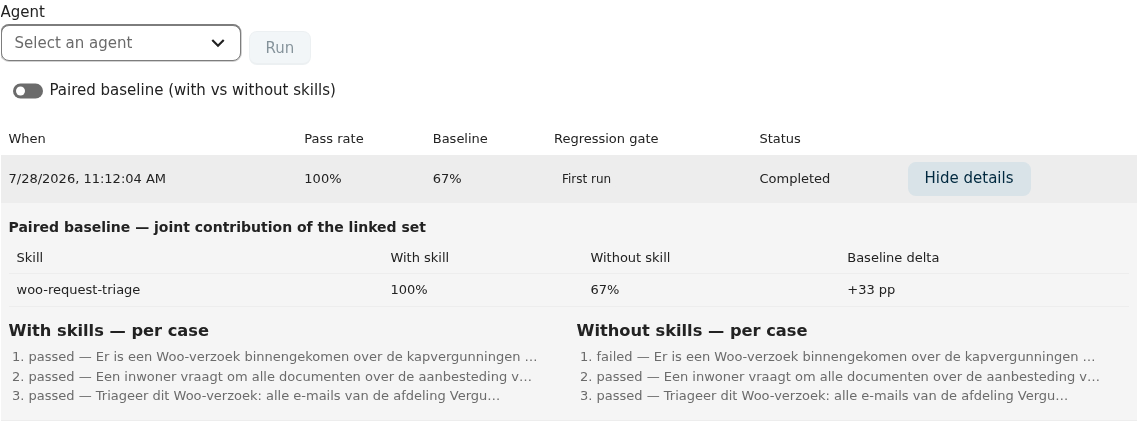
Verify: the run detail shows passRate, baselinePassRate, and a
baselineDelta for woo-request-triage.
Step 6: Watch the L5 evidence arrive
A completed paired run is the only writer of L5 evidence in Hermiq. On
completion, each linked skill receives levelEvidence.l5: the dataset id, the pass
rate, the baseline delta, the completion timestamp, and the attribution mode. Failed
or budget-blocked runs write nothing.
- Open the
woo-request-triagedetail page. - The eval evidence card now shows the pass rate, the delta, the last-validated timestamp, and a pass-rate trend across this dataset's runs. In joint mode with several linked skills, the card labels the delta as a joint contribution, never as a per-skill marginal.
- The maturity badge has not moved yet. Evidence and level are decoupled on purpose: run Qualify (Part 2) to fold the new evidence into the level.
The card also offers Run paired eval directly, with the same dataset picker, agent picker, and cost note, so future re-validation starts from the skill.
Verify: after qualifying, the scorecard reports L5 with the evidence values, provided L1 through L4 pass for this skill. If L4 is not attested yet, the scorecard says so; the evidence waits, contiguity holds.
What you get
A measured skill. The badge now rests on a with/without comparison through the real engine, and the scorecard shows when it was last validated. When the skill's content changes, the trend on the eval evidence card tells you whether it is drifting.
Troubleshooting
The Paired baseline toggle is disabledThe dataset has no linked skills. Link at least one skill in the Linked skills panel; baseline runs on an unlinked dataset are rejected.
The run ends as blocked_budget or blocked_killswitchThe same gates that stop a scheduled run stop an eval run, before any case executes. Check the organisation's budget hard cap and kill-switch under tenant operations, then re-run.
The rubric case fails with an error message about model policyJudge calls go through the same provider chokepoint as every other LLM call, so tenant model policy applies to them too. The case records the violation and fails; the run still completes. Allow the judge model in the policy or adjust the case.
Where to go from here
Measurement is the gate everything else passes through. Part 4 closes the loop: skills that capture learnings from their own runs, propose improved versions of themselves, and still never change without your approval.