Buildiq is a Nextcloud app built on OpenRegister. Reading about what it does is not the same as clicking through it, and standing up a Nextcloud by hand to find out is more work than most people will do on a first look.
This tutorial removes that step. One file, two commands, and you are looking at the real thing.
Decidiq is a Nextcloud app built on OpenRegister. Reading about what it does is not the same as clicking through it, and standing up a Nextcloud by hand to find out is more work than most people will do on a first look.
This tutorial removes that step. One file, two commands, and you are looking at the real thing.
Dossiq is a Nextcloud app built on OpenRegister. Reading about what it does is not the same as clicking through it, and standing up a Nextcloud by hand to find out is more work than most people will do on a first look.
This tutorial removes that step. One file, two commands, and you are looking at the real thing.
Filinq is a Nextcloud app built on OpenRegister. Reading about what it does is not the same as clicking through it, and standing up a Nextcloud by hand to find out is more work than most people will do on a first look.
This tutorial removes that step. One file, two commands, and you are looking at the real thing.
Hermiq is a Nextcloud app built on OpenRegister. Reading about what it does is not the same as clicking through it, and standing up a Nextcloud by hand to find out is more work than most people will do on a first look.
This tutorial removes that step. One file, two commands, and you are looking at the real thing.
Humaniq is a Nextcloud app built on OpenRegister. Reading about what it does is not the same as clicking through it, and standing up a Nextcloud by hand to find out is more work than most people will do on a first look.
This tutorial removes that step. One file, two commands, and you are looking at the real thing.
Integriq is a Nextcloud app built on OpenRegister. Reading about what it does is not the same as clicking through it, and standing up a Nextcloud by hand to find out is more work than most people will do on a first look.
This tutorial removes that step. One file, two commands, and you are looking at the real thing.
Keepiq is a Nextcloud app built on OpenRegister. Reading about what it does is not the same as clicking through it, and standing up a Nextcloud by hand to find out is more work than most people will do on a first look.
This tutorial removes that step. One file, two commands, and you are looking at the real thing.
Larpinq is a Nextcloud app built on OpenRegister. Reading about what it does is not the same as clicking through it, and standing up a Nextcloud by hand to find out is more work than most people will do on a first look.
This tutorial removes that step. One file, two commands, and you are looking at the real thing.
Launchpad is a Nextcloud app built on OpenRegister. Reading about what it does is not the same as clicking through it, and standing up a Nextcloud by hand to find out is more work than most people will do on a first look.
This tutorial removes that step. One file, two commands, and you are looking at the real thing.
Learniq is a Nextcloud app built on OpenRegister. Reading about what it does is not the same as clicking through it, and standing up a Nextcloud by hand to find out is more work than most people will do on a first look.
This tutorial removes that step. One file, two commands, and you are looking at the real thing.
OpenCatalogi is a Nextcloud app built on OpenRegister. Reading about what it does is not the same as clicking through it, and standing up a Nextcloud by hand to find out is more work than most people will do on a first look.
This tutorial removes that step. One file, two commands, and you are looking at the real thing.
OpenRegister is a Nextcloud app built on OpenRegister. Reading about what it does is not the same as clicking through it, and standing up a Nextcloud by hand to find out is more work than most people will do on a first look.
This tutorial removes that step. One file, two commands, and you are looking at the real thing.
Pipelinq is a Nextcloud app built on OpenRegister. Reading about what it does is not the same as clicking through it, and standing up a Nextcloud by hand to find out is more work than most people will do on a first look.
This tutorial removes that step. One file, two commands, and you are looking at the real thing.
Planninq is a Nextcloud app built on OpenRegister. Reading about what it does is not the same as clicking through it, and standing up a Nextcloud by hand to find out is more work than most people will do on a first look.
This tutorial removes that step. One file, two commands, and you are looking at the real thing.
Portaliq is a Nextcloud app built on OpenRegister. Reading about what it does is not the same as clicking through it, and standing up a Nextcloud by hand to find out is more work than most people will do on a first look.
This tutorial removes that step. One file, two commands, and you are looking at the real thing.
Shillinq is a Nextcloud app built on OpenRegister. Reading about what it does is not the same as clicking through it, and standing up a Nextcloud by hand to find out is more work than most people will do on a first look.
This tutorial removes that step. One file, two commands, and you are looking at the real thing.
Stackiq is a Nextcloud app built on OpenRegister. Reading about what it does is not the same as clicking through it, and standing up a Nextcloud by hand to find out is more work than most people will do on a first look.
This tutorial removes that step. One file, two commands, and you are looking at the real thing.
Thematiq is a Nextcloud app built on OpenRegister. Reading about what it does is not the same as clicking through it, and standing up a Nextcloud by hand to find out is more work than most people will do on a first look.
This tutorial removes that step. One file, two commands, and you are looking at the real thing.
Versioniq is a Nextcloud app built on OpenRegister. Reading about what it does is not the same as clicking through it, and standing up a Nextcloud by hand to find out is more work than most people will do on a first look.
This tutorial removes that step. One file, two commands, and you are looking at the real thing.
Zaakafhandelapp is a Nextcloud app built on OpenRegister. Reading about what it does is not the same as clicking through it, and standing up a Nextcloud by hand to find out is more work than most people will do on a first look.
This tutorial removes that step. One file, two commands, and you are looking at the real thing.
Connext is not one app. It is a registry (OpenRegister) with a set of applications built on top of it, and the interesting behaviour lives in how they fit together — a catalogue that publishes, a portal that renders it, a connector that feeds it. Reading about that is not the same as clicking through it.
This tutorial gets the whole thing running locally so you can click through it.
This is a demo environment, not a development environment. It runs the real software and behaves the same way, so what you learn here applies to a production deployment. But nothing here is backed up, and docker compose down -v permanently deletes all of it. Explore freely; do not put real data in it.
You need v2.23 or newer. If it prints something older, upgrade before continuing.
This matters more than a version check usually does. The compose file declares its install scripts inline, using a Compose feature older versions do not have — and they do not complain about it. They ignore the field, start Nextcloud with no applications installed, and give you an empty instance with nothing in the logs to explain why.
Nextcloud then installs itself and enables the apps in dependency order — OpenRegister first, because every other app declares its registers and schemas against it, and a leaf app enabled before it finds no register to attach to.
The stack is ready when this returns "installed":true:
Start with the portal. It is public — no login — and that is the point: it is what a citizen would see. Signing in as admin shows you a different and more permissive view.
One instance can host several portals, and Portaliq resolves which to serve in exactly two ways: an explicit ?portal=<slug>, or a request hostname matching a portal's verified domain.
There is deliberately no third mode and no default-portal fallback. A default is precisely how a multi-tenant host ends up serving one tenant's content under another tenant's domain. The seeded demo portal ships with no domains at all, because an install hook has no business claiming a hostname on your behalf — so the slug parameter is how you reach it.
On a throwaway box you can bind localhost yourself under Portaliq → Portals → demo → Domains, mark it verified, and then drop the parameter.
This is the step people skip, and it is the one worth doing.
A page loading is not a page working. Nextcloud serves its page shell before an app decides whether it has anything to render, so the portal URL returns HTTP 200 even when it resolves to nothing at all. A smoke test that checks for a 200 would call that a success.
So check content instead:
# Should name the portal — not answer {"error":"not_found"}
The second one deserves a note. An empty directory does not mean "no federation peers" — it means the register configuration was never imported. Those two states are indistinguishable from the outside, and one of them is a broken install. That ambiguity is exactly why the check is worth running rather than trusting the absence of an error.
By default each app resolves to its newest release, pre-releases included, because most Connext apps do not yet publish a stable one. That is honest about what exists, but it is not reproducible.
You may notice this compose file downloads release archives rather than pointing at repositories, and that no volume maps to a directory on your machine. Both are deliberate.
Nextcloud installs and updates an app by deleting the app directory and extracting a fresh archive over it. Point that at a git checkout and an app-store update will delete your working tree — we measured exactly that on a development machine in August 2026: an updater fired on a container restart and removed every top-level file from a bind-mounted checkout, including its .git directory.
There is a second reason, and it is the one that bites quietly. A release archive is a complete application: it carries its vendor/ directory and its built JavaScript. A git clone carries neither — and a Nextcloud app with no vendor/ does not fail loudly. It warns once and keeps loading, so the app appears installed while every service that needs a dependency is silently missing.
To work on these apps rather than with them, you want a development environment instead. This file cannot serve that purpose and does not try.
Troubleshooting
Something not behaving? Find the matching situation below.
!`app-installer` exits and some apps are missing
The log ends with !! NOT INSTALLED: <names>. An archive could not be downloaded — usually a pinned version with no matching release. The rest of the stack still starts; run up again to retry the missing ones.
!The whole thing stops with `openregister missing; aborting`
OpenRegister could not be downloaded, and the installer refuses to continue without it. Every other app declares registers against OpenRegister, so a stack without it would start and then fail in a dozen confusing ways instead of one clear one. Check your connection and run up again.
!The portal renders but has no styling
NLDesign is not installed or not enabled. The theme resolver deliberately renders unthemed rather than wrong when it is absent, so this is a cosmetic failure, not a broken portal.
!The directory API answers `{"results":[],"total":0}`
The register configuration was not imported. Re-run it from Settings → OpenCatalogi → Reload configuration.
!Everything returns 404 or a maintenance page after a restart
Nextcloud is waiting for an upgrade. Run docker compose -f connext-compose.yml exec -u www-data nextcloud php occ upgrade.
!Ports 8700 is already in use
Set another one: CONNEXT_PORT=9000 docker compose -f connext-compose.yml up -d. The port also has to appear in the trusted-domain list, which the compose file handles for you from the same variable.
Next step
A running stack is the entry point, not the destination.
Passwords, API keys, tokens, certificates — every team has them, and most teams keep them somewhere they shouldn't. Keepiq puts them in the workspace people already log into, encrypted so that not even the administrator can read them. The full recording is above.
Most agent platforms ask you to ship your data somewhere else. Hermiq runs the agents inside the Nextcloud you already operate — agents, their memory and their skills all stored as OpenRegister objects, governed and audited like anything else on the instance. The full recording is above.
Government interfaces are supposed to look and behave a particular way, and building that yourself is a front-end project nobody asked for. Thematiq makes it an install. The full recording is above.
Also useful first — the Claude Skills tutorial series
Hermiq skills use the same idea as Claude Code skills: a Markdown document that teaches
an agent one capability. If the concept is new to you,
part 1 of the Claude Skills series
(10 minutes) is a good primer. This series stands on its own, though.
A Hermiq agent gets new capabilities through skills: Markdown documents in the
open agentskills.io format, stored as OpenRegister objects.
In this part you browse the skills catalog, read the anatomy of the seeded example
skills, install one onto an agent, and author your own skill twice: once by hand in
the markdown form, once in conversation with the seeded skill-creator skill.
Every skill row in the Hermiq catalog carries a badge of seven dots. In this part you
learn what the dots mean, run the Qualify action to earn them mechanically, read
the scorecard that explains every failure, and attest level 4 as a human curator. You
also learn why the ladder deliberately gets harder to climb from level 5 on.
A skill that "feels right" can still add nothing, or make the agent worse. Paired
evals answer the question with two runs of the same cases: one with the skill, one
without. In this part you use the seeded woo-triage-paired-eval dataset to run a
paired baseline against woo-request-triage, read the delta, and watch the L5
evidence appear where Part 2 left a named gap.
A self-improving skill sounds like a skill that edits itself. In Hermiq it is the
opposite: every improvement is a draft that must survive a content scan, an eval
gate, and your explicit approval before it becomes a new version. In this final part
you read the learnings the seeded tender-summary skill has captured, review its
pending improvement draft, decide it, and learn the version history, rollback, and
republish surfaces that keep the whole loop reversible.
LaunchPad turns the single, fixed Nextcloud dashboard into a set of personal,
drag-and-drop workspaces. Every user gets their own dashboards; every dashboard
is an independent canvas with its own layout, its own widgets, and its own URL.
Admins keep control — roll out templates, restrict widgets per group, and pin a
group-wide default — while users still get the freedom to personalise.
This tutorial walks the whole surface end to end, from a first-run dashboard to
an admin rollout, using nothing but the UI.
Click the LaunchPad icon in the Nextcloud app launcher, or visit
/apps/launchpad/ directly. The very first time you open it, LaunchPad creates a
personal dashboard for you and seeds it with a starter bundle so you never face
an empty grid.
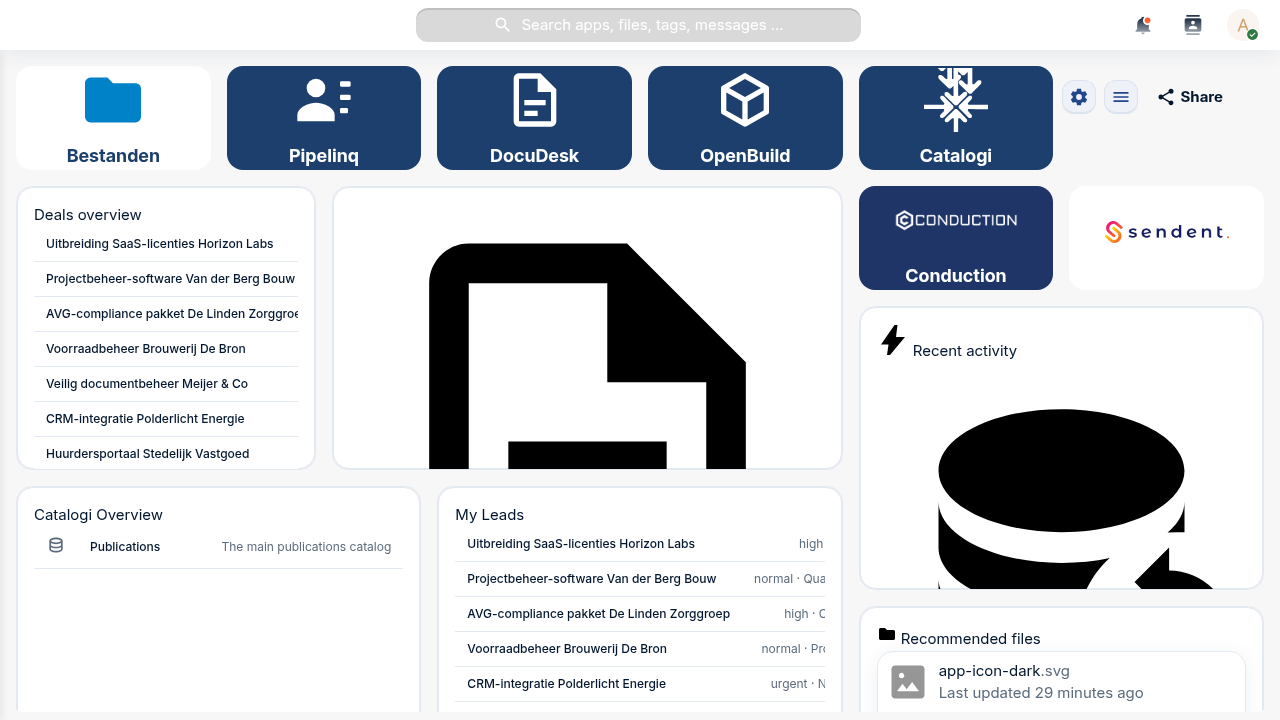
A LaunchPad workspace. The top row is shortcut tiles; below them are widgets, including native Nextcloud dashboard widgets proxied straight onto the grid.
Two things share the grid, and it's worth knowing the difference from the start:
Tiles are shortcut cards — an icon, a colour, a label, and a link to an app or URL. They are LaunchPad's own lightweight launcher.
Widgets are content blocks. LaunchPad renders both its own custom widgets (Label, Text, Image, Link-button, Files, People, News, Calendar, …) and any native Nextcloud dashboard widget (Activity, Recommended files, Calendar, Talk, your other apps' widgets) on the same grid.
Open the active dashboard's cog menu (top-right of the workspace) and click
Edit dashboard. Resize handles appear on every placement, and each tile and
widget grows a small menu button in its corner.
To add a LaunchPad custom widget, open the cog menu again and choose Add
custom widget…. The Add Widget modal opens:
Pick a Widget type (for example Link Button).
Fill in the type-specific fields — a label, a URL, an action type, colours.
Optionally open the Appearance section to set a custom title, a
background, and an icon.
Click Add. The widget lands on the grid and is saved immediately.
For a native Nextcloud widget, the same picker family lets you choose the
Nextcloud widget you want (Activity, Recommended files, a widget from any other
installed app) — it's proxied onto the grid exactly as in Step 1.
Troubleshooting
The widget type list only shows a few options. Custom widget types that haven't shipped a configuration form yet are filtered out of the picker — only types you can actually configure appear. Native Nextcloud widgets come from whatever apps are installed and expose a dashboard widget.
Still in edit mode, add a tile for a link you use constantly. Open a tile's
menu → Edit tile (or add a new one) and you get:
A Title.
An Icon — a searchable Material Design Icons catalogue (7,000+ icons) on
the Icons tab, plus a Custom tab. When the nldesign app is enabled, the
Custom tab also offers the NL Design government icon set; when it isn't, that
pack is simply hidden rather than showing broken images.
Background and Text colours.
A URL — an app path like /apps/files or any external link.
Tiles are the fast way to turn a dashboard into a launcher for your team's most
-used tools.
The grid is a responsive 12-column layout. In edit mode:
Drag a widget by its header to move it; neighbours reflow around the drop
point and the layout saves as soon as you release.
Resize from the corner/edge handles.
Edit any placement's content and appearance from its Edit widget
entry (content fields and the Appearance section — show-title, custom title,
background, icon — live in one modal).
Delete widget removes a placement immediately (there's no undo, so toggle
Show title off instead if you only want to de-emphasise it).
When you open /apps/launchpad/ cold, LaunchPad has to pick a dashboard to land
you on. Your personal pin always wins. Open the cog menu on the dashboard you
want and click Set as default — a ★ marker appears next to it in the
sidebar, and that's where LaunchPad opens from now on.
Use the Share button (or the cog menu's Share) to open the sharing
surface. Today it shares a dashboard with specific users and groups, each
with a permission level — View only, Add only, or Full customization.
Troubleshooting
Where's the public link? LaunchPad has a public-share API (a tokenised, brute-force-protected read-only link at /apps/launchpad/s/{token}), but the point-and-click control to create one from the UI is still on the roadmap. For now the Share button covers logged-in user/group sharing; public links are minted via the API.
Step 8 — Switch hats: roll out a template (admin)
Everything so far was per-user. Now the admin side. Open Settings →
Administration → LaunchPad.
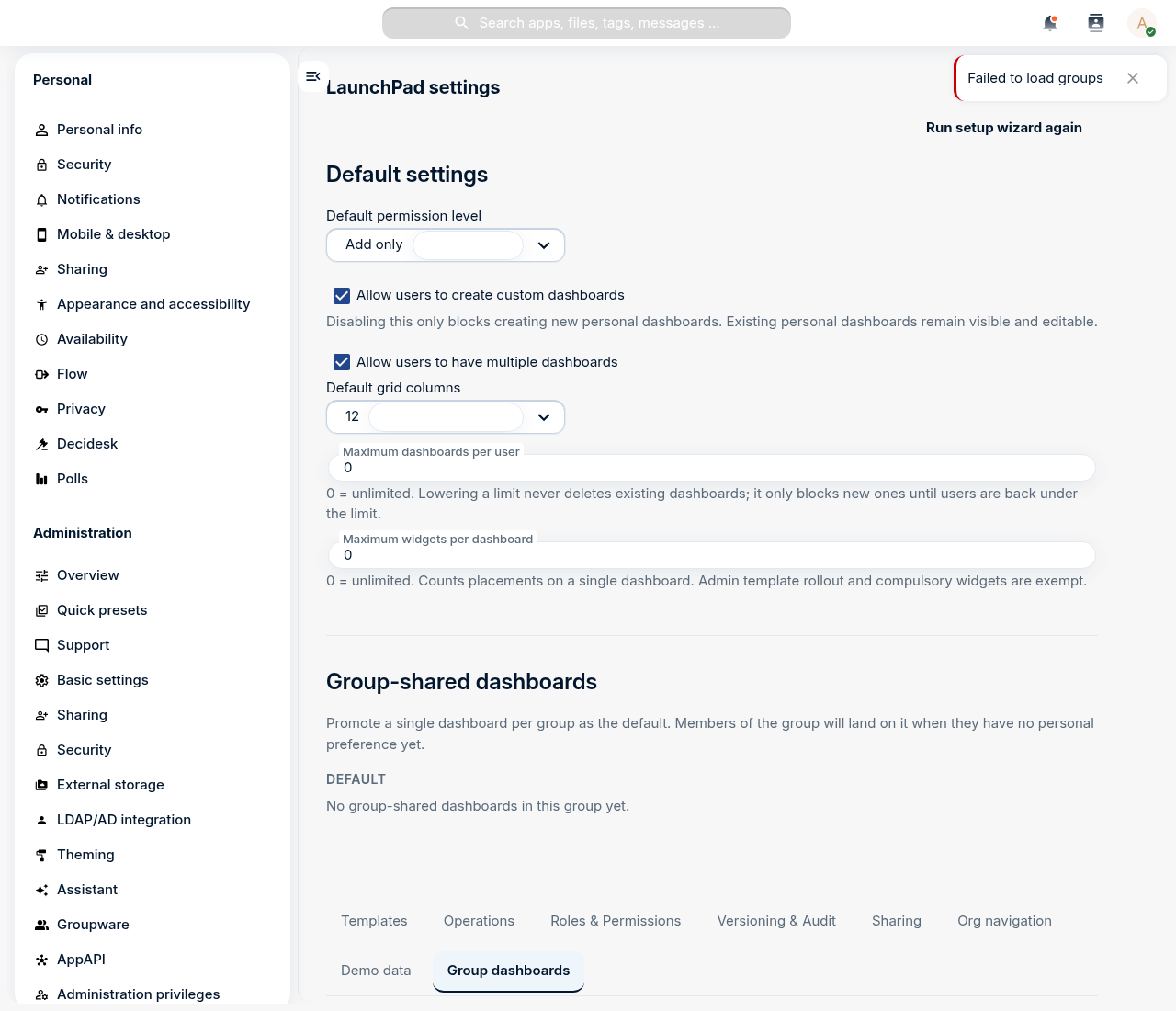
LaunchPad's admin settings: global defaults up top, then a tabbed strip for templates, roles, group dashboards, operations and more.
The top of the page holds the global defaults — whether users may create
personal dashboards, how many they may have, the default permission level, grid
columns, and per-dashboard widget limits.
On the Templates tab, click Create template to author a dashboard
centrally and assign it to one or more Nextcloud groups. The first time a member
of an assigned group opens LaunchPad, they get their own editable copy of the
template — a consistent starting layout without locking anyone in. Mark widgets
as compulsory in the template and users can't remove them.
On the Roles & Permissions tab you define, per Nextcloud group, an
allow-list of widget types. Members of a restricted group see a filtered picker
— handy for keeping niche or sensitive widgets out of specific teams, or for
reducing choice for non-technical users. An empty list means the full catalogue
(the default).
The other tabs round out the admin surface: Group dashboards (one shared
dashboard per group, plus the org-wide default set), Sharing (org-wide share
defaults and forced-share groups), Operations (health + Prometheus metrics),
Versioning & Audit (conditional-visibility rules and privacy-preserving view
analytics), and Org navigation (an organisation-wide navigation tree).
Finally, land every user on LaunchPad after login. This one lives in Nextcloud
core, not LaunchPad's own settings: Settings → Administration → Theming →
Navigation bar settings, enable Use custom default app, and put
LaunchPad first in the priority list. Optionally disable the stock
Dashboard app so the two don't compete. LaunchPad registers under the app id
launchpad, which is the value Nextcloud uses everywhere it refers to the app.
Troubleshooting
The menu tile opens the wrong app. LaunchPad is registered under the folder-derived id launchpad. If a custom navigation entry points at an old mydash.* route it won't resolve — use launchpad.page.index.
You took the fixed Nextcloud dashboard and turned it into a personalised,
multi-dashboard workspace: native and custom widgets side by side, shortcut
tiles, a second context, a pinned default, and shared access — then, as an
admin, rolled a template out to a group, fenced off widgets per group, and made
LaunchPad the front door for everyone.
Shillinq is an open-source business-administration app for the
Nextcloud workspace. It covers double-entry bookkeeping, sales and purchase
invoicing, procurement, contract management, and bank reconciliation, all on top
of OpenRegister. This first tutorial keeps it small: you
install the app, get your bearings on the Financial overview dashboard, and
create your first sales invoice with the quick draft. Everything happens in
the browser, no configuration files.
A walk-through of Hydra, Conduction's agentic app factory — the full recording is above. When you're ready to build with it, the hands-on tutorial series takes you from zero to a live Hydra run.
How a single manifest turns into a running app — the full recording is above. To build one yourself, the Build-an-app series walks the manifest from first schema to shipped app.
Building and shipping an app in the browser, no code required — the full recording is above. The hands-on tutorial walks the same build step by step so you can follow along.
OpenRegister is the data engine behind every Conduction app. It stores your data not as rows in a hand-built table but as objects that follow a schema you design, grouped into a register you own. Where a traditional application bakes its data model into code and a database migration, OpenRegister lets you draw the model in the interface and start storing real records the same minute, with versioning, an audit trail, search, files and permissions all handled for you.
This tutorial builds a Pet Store data model, the canonical Conduction sample domain. You will create a register, design a pet schema, add owner and category schemas with real relations between them, fill the register with pets through the interface, attach a photo to one, make pets findable in Nextcloud's search, and finally export the whole thing as a configuration file that travels to any other instance. No code, no database, no deploy.
OpenCatalogi is the publishing layer for Conduction apps. Where OpenRegister stores your data and Integriq fills it from elsewhere, OpenCatalogi turns a register you own into a public, browsable, harvestable catalog: a set of API endpoints that anyone on the internet can read, and a DCAT-AP-NL feed that national portals like data.overheid.nl and data.europa.eu can harvest. It does this without a "publish" button and without copying your data anywhere — publishing is a rule on the data, enforced by OpenRegister, and a catalog is just a filter that says which data belongs in the shop window.
This tutorial takes the Pet Store register you built in the first two parts and makes it public. You scope a catalog to the register, set up the visibility rule, publish nine pets while deliberately keeping one hidden, prove the rule from a logged-out browser, and expose the whole thing as a DCAT-AP-NL feed. No code, no second server, no export.
Integriq is the integration engine for Conduction apps. Where OpenRegister stores the data you own, Integriq reaches out to data you do not — a case-management API, an open-data portal, a partner's REST service — and pulls it into a register on a schedule, reshaped to fit your own schema. It does this without a line of integration code: you describe where the data lives, how a record should be reshaped, and what should run, and Integriq does the fetching, the transforming, the writing and the deduplicating for you.
This tutorial fills the Pet Store register you built in Part 1 from a real, public, external API — the Swagger Pet Store. You register that API as a source, test it, write a Twig mapping that turns an external pet into a pet-academy object and test the mapping against a sample record, build a synchronisation that ties it all together, run it for real to create pets in your register, and schedule it so it keeps the register current. No code, no cron file, no glue.
Buildiq is the visual builder for Conduction apps. The three-paths tutorial teaches the manifest path by hand: you write manifest.json and the Cn* components render it. Buildiq builds that exact same manifest for you through a UI. You point and click, Buildiq writes the manifest and the OpenRegister schemas behind it, and you get a working Nextcloud app with no repository, no build step, and no deploy.
This tutorial builds a Pet Store with a veterinary layer, the canonical Conduction sample domain. By the end you have an app your whole organisation can open: a dashboard of live numbers and charts, browsable lists of pets and owners, a rich pet profile page, a vets-only medical section, a released production version, a widget on everyone's LaunchPad, vet appointments in Nextcloud Calendar, and photos attached to each pet. Everything in this tutorial is built in the Buildiq UI against a real OpenRegister behind it.
The first three parts of this series set up the registers, the files, and a public catalog for Dutch open-government data. Conduction also has a three-tutorial pipeline that teaches the same three apps from the ground up, end to end, on the canonical Pet Store sample:
This capstone is the Woo & DCAT overlay on that pipeline. Rather than repeat the mechanics, it points you at each deep tutorial and then layers the open-government specifics on top: the canonical registers you import instead of hand-building, the open-data source you map to a Dataset, and the DCAT-AP-NL feed that national portals harvest. The shape is identical to the Pet Store chain — grab data from a source, and publish it on a catalog — only the domain changes.
In Part 1 you imported a DCAT register for open data. In this tutorial you make its datasets findable: you scope a catalog to the register, set one date field that controls visibility, and expose the catalog as a DCAT-AP-NL feed. National portals like data.overheid.nl harvest that feed.
In part 5 you ran Hydra by hand: build the images, run a stage with dev-run.sh, label an issue. That is the right way to learn Hydra, but it is not how it runs day to day. In production nobody starts containers from a terminal. Instead a scheduled flow notices the labelled issue and has each stage run for it, with no one at the keyboard. This part explains that path, where the pre-built images fit in, and the three deployment models behind it.
Most teams already write down what they are going to build. They open a ticket: "As a user I want a search box, so that I can find pets quickly." That sentence has served software teams for twenty years. At Conduction we write specs instead. The reason is simple: the developer reading the ticket is now an LLM, not a colleague, and an LLM needs a different kind of brief. This opener explains why, before the rest of the series gets into the how.
A spec tells you what one feature must do. But "build a search box" leaves a hundred questions unanswered that have nothing to do with search. Which data layer? Vue 2 or Vue 3? Where do modals live? Which licence header? Answering those per spec would be madness, and an AI would answer them differently every time. That is what ADRs are for. They are the standing context that every spec is built on top of. This part explains what they are, how they are written, and how Conduction splits them across the fleet.
In Part 1 you learned that a scenario describes behaviour in GIVEN / WHEN / THEN form. In Part 2 you wrote one. This part closes the loop. A scenario is a test you have not run yet, and OpenSpec gives you a mechanical way to prove that every scenario in a spec is exercised by a real browser test. The @e2e annotation and the gate that enforces it are what turn "write a spec" into a safe sandbox for AI. They are also the single biggest thing that separates spec coding from vibe coding.
Let op — dit is een optionele, situationele tutorial. De meeste developers zullen nooit een retrofit hoeven draaien. Het dagelijkse werk in een Conduction-app — changes schrijven, tasks implementeren, PRs openen — raakt geen van de commando's hieronder. Je kunt Deel 1 + 2 afronden en direct doorgaan naar de Hydra-leerlijn of de Claude skills-leerlijn zonder iets te missen.
Dit deel is alleen relevant in één specifiek geval: een oudere Conduction-app moet alsnog onder de huidige OpenSpec-conventie gebracht worden. Een klein aantal van onze apps is gebouwd voordat openspec/specs/ en de @spec-tag-conventie bestonden — ze hebben werkende code, maar geen specs en geen annotaties die vanuit code terug wijzen naar requirements. Als zo'n app ooit in lijn met de conventie gebracht moet worden, is dit de playbook ervoor. We lopen de retrofit-playbook van begin tot eind door.
By Part 6 your PetStore app is shipped and integrated. Along the way the manifest renderer mounted a handful of nc-vue components for you (CnAppRoot, CnPageRenderer, CnIndexPage, CnDetailPage, CnDashboardPage, CnObjectSidebar, CnMarkdownEditor) and Part 5b walked through the dashboard widget vocabulary. The lib ships ~70 Cn* components and a dozen composables. Part 7 is the capability tour: which component to reach for when, what the composable layer does for you, and how the whole library fits together so you stop guessing.
This is a tour, not a reference. The full prop tables live on nextcloud-vue.conduction.nl. Use Part 7 to build the mental map; use the lib docs to look up signatures.
A 45-minute tutorial that gives your PetStore app a documentation site. Hosted from your own GitHub repo via the central documentation workflow, illustrated with abstract screen mocks that compose from design tokens, and brought to life with real screenshots that Playwright captures from your running app. By the end, every push to development rebuilds and republishes.
Een werkend Conduction-workstation heeft een specifieke combinatie aan tools nodig: Claude Code, Docker, een lokaal draaiende Nextcloud, Playwright, een handvol globale Claude-instellingen en hooks, en een werkende gh CLI. Nieuwe developers verliezen vaak hun eerste dag (of twee) aan setup-puzzels die wij intern al opgelost hebben. Deze leerlijn van zes delen brengt je in één avond van een schone laptop naar een werkend workstation. Deel 1 — dit deel — beantwoordt de vraag wat installeer je, en waarom voor je door installers gaat klikken.
Dit is het deel met de meeste installatie-commando's. WSL2, Docker Desktop, VS Code met de juiste extensies, de language-runtimes (Node, PHP, Composer), de CLI's (gh, OpenSpec) en de Playwright Chromium-binary. Aan het einde van Deel 2 heb je een werkend dev-workstation — alleen Claude Code is nog niet aangesloten. Dat is Deel 3.
Met de runtimes uit Deel 2 op zijn plek wordt het tijd voor de AI-pair-programmer waar we daadwerkelijk mee werken: Claude Code. Dit deel behandelt de installatie, het inloggen, en — het stuk dat je niet moet overslaan — de verplichte global settings en safety hooks die voorkomen dat Claude zonder jouw goedkeuring destructieve shell-commando's draait. Kort deel, belangrijk deel.
MCP — Model Context Protocol — is de standaard-interface waarmee Claude Code naar externe tools praat. Binnen een Conduction-project betekent dat in de praktijk twee dingen: een Playwright-browserpool (browser-1 … browser-7) voor de testing-skills, en de OpenRegister MCP-server voor directe toegang tot je lokale Conduction-datalaag. Een workstation is pas echt af als minstens de browserpool via .mcp.json in je project-root is aangesloten. Dit deel behandelt dat; de OpenRegister MCP-server staat in een eigen tutorial — daar linken we onderaan naar.
Een workstation zonder Nextcloud is een halve workstation. Bijna elke andere tutorial in de academy gaat ervan uit dat je er een hebt draaien op localhost:8080. Het goede nieuws: er is al een speciale tutorial die dit van begin tot eind behandelt. Deze module is een korte brug die uitlegt waarom je het nu doet, welke Conduction-apps je installeert zodra het draait, en hoe dit deel aansluit op de rest van de serie.
Je workstation is klaar. WSL2, Docker, VS Code met de juiste extensies, Claude Code met de veiligheidshooks actief, de MCP-browserpool aangesloten, Nextcloud lokaal draaiend met de apps die je nodig hebt. Sta er even bij stil — vroeger verloren de meeste nieuwe Conduction-developers er een of twee dagen aan; jij hebt het in één avond gedaan. Dit laatste deel is een korte kaart van de volgende tutorials, gegroepeerd naar wat voor werk je gaat doen.
Spec-gedreven ontwikkeling draait de gebruikelijke volgorde om. Je schetst niet eerst de feature, schrijft de code, en documenteert daarna misschien wat je hebt gebouwd. Je schrijft eerst de specificatie — in Markdown, met RFC 2119-sleutelwoorden en GIVEN/WHEN/THEN-scenario's — en een AI-agent (Hydra) implementeert code die daaraan voldoet. De rol van de mens schuift een niveau omhoog: jij ontwikkelt context, geen code.
Dat klinkt idealistisch totdat je het in de praktijk ziet werken. De apps van Conduction worden vandaag in productie op deze manier gebouwd. Deze tutorial loopt door de workflow: wat OpenSpec daadwerkelijk is, hoe ADR's op organisatie- en app-niveau features samenhangend houden, wat de explore- en apply-skills doen, en hoe de kwaliteits- en gatekeeping-harness het resultaat valideert voordat er ook maar iets in main landt.
This is Part 5 of the nine-part app-building tutorial series. Parts 1–4 got you a working app: scaffold, schemas + manifest, schema-driven Calendar integration, and a custom Care tab. Part 5 is the "now what": the v2.7.0 manifest features Parts 1–4 deliberately skipped so the learning curve stayed gentle. You don't need any of them to ship PetStore, but the moment your app needs a public form, a wiki, an admin-only listing, or a markdown editor inside a form, they save you from another round of hand-rolled Vue.
Parts 5 and 6 are parallel
This part deepens the manifest surface. Part 6: Integrate widens the app to other systems (cross-register reads, Integriq sources, webhooks). Both build directly on Part 4. Take them in either order, or pick whichever your next app needs first.
Three principles run through every feature in this part: schema-driven (no per-page Vue), type-safe (the manifest schema validates every shape before runtime), and fleet-portable (the same JSON works in every Conduction app and gets lib upgrades for free).
This is Part 6 of the nine-part app-building tutorial series. Part 4 packaged the app and put it on the Conduction store; this part makes it talk to the rest of the workspace: three integration patterns layered from least to most invasive. By the end your orders know who their supplier is, every order shows the right care guide from xWiki, and a needs_followup order automatically opens a maintenance page in xWiki that flips the order back to delivered when the page is marked resolved.
Parts 5 and 6 are parallel
Both build directly on the shipped app from Part 4. Part 5: Advanced manifest features deepens the manifest surface (actionToggles, fieldWidgets, public-mode pages). Part 6 widens to other systems. Take them in either order, or pick whichever your next app actually needs first. Neither references the other for content.
The point isn't the specific integrations, it's the pattern. Cross-register reads are how Conduction apps share data without coupling. The Integriq source-and-synchronisation pattern is how you absorb data from anywhere into your own register. The webhook endpoint pattern is how external systems push state back. Once you've wired all three, you've covered the integration vocabulary the rest of the catalogue uses.
De OpenWoo-community komt elke tweede dinsdag van de maand samen. Leveranciers (Conduction, Xxllnc, OpenGemeenten, SHIFT2, Acato, Notubiz, iO), gemeenten in productie of acceptatie, en KOOP delen voortgang, blokkeerders, en het volgende stuk van de roadmap. Onder staan alle opgenomen sessies sinds eind 2023.
Part 4 of the nine-part app-building tutorial series. Part 3 made orders appear in NC Calendar with one schema annotation. Part 4 brings external knowledge, category-specific care advice, husbandry notes, feeding tips, from xWiki into the pet detail sidebar via a care_guide OpenRegister schema. Then we package the app and ship it.
External knowledge integration is the canonical case for Integriq. Pull data from a system you don't own (xWiki here, but the same applies to Confluence, Notion, SharePoint, Decos, Mendix), surface it inside Nextcloud-native UI without making the user context-switch.
This is Part 3 of the nine-part app-building tutorial series. Part 2 wired the pet and order schemas. Part 3 makes those orders appear in every user's Nextcloud Calendar (without writing a controller, an event listener, or any per-app calendar glue).
The trick: OpenRegister already ships an ICalendarProvider (RegisterCalendarProvider) that exposes any schema with a calendarProvider block as a virtual calendar. You declare the block on the order schema. NC Calendar shows the events. That's the whole story.
Claude Skills zijn het mechanisme waarmee je Claude Code uitbreidt met herbruikbare, gespecialiseerde gedragingen. Denk aan Conductions eigen /review-pr, /opsx-new of de hele hydra-gate-* familie: stuk voor stuk skills. Dit eerste deel legt in tien minuten uit wát een skill is, hoe hij geactiveerd wordt, en wanneer je beter géén skill maakt. Het is deel 1 van een leerlijn van vier; aan het eind sta je klaar om er in deel 2 zelf een te schrijven — en in deel 3 introduceren we het 7-level maturity-framework waarmee je een skill van "voelt goed" naar "gemeten goed" brengt (deel 4 gaat door op L6 en L7).
In deel 1 zag je wát een skill is. In dit deel ga je er zélf eentje schrijven: een werkende git-status-summary skill die een leesbare samenvatting maakt van de huidige working tree. Aan het eind staat hij in je ~/.claude/skills/-folder, kun je hem aanroepen via /git-status-summary, en weet je hoe je hem deelt met je team.
Je hebt nu een werkende skill — maar werkt hij ook écht goed? En blijft hij goed werken als Claude zelf een upgrade krijgt of als je de skill aanpast? Dit derde, optionele deel laat zien hoe je een skill systematisch evalueert: test-scenario's, trigger-tests, een baseline-meting, en de eval-runner die /skill-creator voor je inricht. Dit is de stap van Maturity Level 4 ("voelt goed") naar Level 5 ("gemeten goed").
In deel 3 bracht je een skill van "voelt goed" naar "gemeten goed" — Maturity Level 5. Voor de meeste skills is dat genoeg. Maar voor een handvol skills die je dagelijks gebruikt of die andere skills aansturen, wil je verder: een skill die leert van zijn eigen executies (L6), en een skill die andere agents aanstuurt in een grotere workflow (L7). Dit vierde deel laat zien hoe je daar komt — én hoe je met het Hydra-dashboard je hele skill-library tegelijk op maturity bewaakt.
This is Part 2 of the nine-part app-building tutorial series. Part 1 left you with an empty app shell, a chassis, no data. Part 2 fills the chassis: three schemas (modelled on the OpenAPI Pet Store), a manifest, and the same five Cn* pages drive every list, every detail view, every dashboard with the schema as the single source of truth.
The shape we keep saying "this saves you code" finally has numbers behind it: ~200 lines of hand-rolled Vue collapse to three.
Haven is een VNG-standaard voor gemeentelijke Kubernetes-clusters. Deze module legt uit wat de standaard voorschrijft, waarom hij bestaat, en hoe je de bouwstenen lokaal nabootst met kind — zodat de term tastbaar wordt voordat je 'm in een aanbesteding tegenkomt.
Hydra werkt op OpenSpec-changes. Ben je nog niet bekend met begrippen als spec, change, requirement en scenario? Doe dan eerst de OpenSpec-leerlijn (deel 1 + 2, samen ~30 minuten). Dat scheelt veel terugzoeken in de rest van deze modules.
Ook nuttig vooraf — de Claude Skills-leerlijn
Een groot deel van Hydra's interne werking leunt op Claude Skills: opsx-*, hydra-gate-*, team-*, test-*. Als je nog nooit een skill geschreven of bekeken hebt, doe dan eerst deel 1 van de Claude Skills-leerlijn (10 minuten). Dat maakt deel 4 van deze leerlijn — waar we de skill-families in Hydra openleggen — veel makkelijker te volgen.
Hydra is Conductions interne agentic CI/CD-platform: een fabriek die OpenSpec-changes omzet in code op een feature branch, gecontroleerd door mechanische gates en, als je daarom vraagt, gereviewd door drie AI-stages. Deze module legt in tien minuten uit wát Hydra is, waaróm het bestaat, en hoe het past binnen onze app-fabriek. Het is het eerste deel van een leerlijn van zeven; aan het eind sta je klaar voor deel 2 over de drie pipelines.
In deel 1 zag je dat Hydra vier personas heeft. In dit deel kijken we naar de pipeline: hoe die personas na elkaar aan één issue werken, welke labels de overgangen markeren, en waar de pipeline stopt. Aan het eind kun je de labels van een issue lezen en weet je precies wat Hydra deed, wat het hierna gaat doen, en waar het op jou wacht.
In deel 2 zag je dat de build-lane bij elke build de hydra-gates-suite draait, en dat een reviewstage waarvan het verdict niet laat zien dat die gates draaiden niet wordt geaccepteerd. Dat zijn mechanische quality gates — checks die deterministisch slagen of falen, zonder AI ertussen. Dit deel legt uit welke gates we hebben, waarom ze mechanisch zijn, en hoe je omgaat met de uitzondering: het vals-positief.
Dit deel duikt direct in de Hydra-specifieke skill-families. Wil je eerst weten wat een Claude Skill überhaupt is, hoe de frontmatter werkt, en wanneer je er zelf eentje schrijft? Doe dan de publieke Claude Skills-leerlijn (drie korte modules, ~40 minuten). Vanaf hier gaan we ervan uit dat je de basics kent.
In de vorige delen ging het over wat Hydra doet. Dit deel gaat over hoe: de skills die de personas hun werk laten doen. Aan het eind weet je welke skills de automatische pipeline (de "Hydra-fabriek") draait en welke je als mens zelf aanroept, ken je de vijf families, en kun je inschatten wanneer een nieuwe skill de moeite waard is.
In de eerste vier delen ging het om concept, pipelines, gates en skills. Tijd om te draaien. Op je eigen machine draai je de stages van Hydra als containers: één stage tegelijk, of de hele keten tegen een wegwerp-repo. Een echte run op een echte app begint met een label, en de flows uit deel 7 nemen het daarna over. Dit deel behandelt beide, met de praktische valkuilen: credentials, de forge-instelling en images.
In deel 5 stond de pijplijn. Dit deel gaat over het andere geval: wat doe je als hij niet groen wordt? Het geeft je de keuzeboom — geordend van goedkoopste interventie naar duurste — en de patronen waarmee je een vastgelopen issue weer in beweging krijgt.
OpenSpec is een lichtgewicht framework voor spec-driven development: eerst opschrijven wat een feature moet doen, dan pas code schrijven. In deze module van twaalf minuten leer je wat OpenSpec is, welke begrippen erin zitten, en waarom we het bij Conduction onder vrijwel elk project gebruiken. Aan het eind sta je klaar voor deel 2, waarin je je eerste change daadwerkelijk schrijft.
Tijd om OpenSpec aan het werk te zien. In dit deel maak je in een Conduction-project je eerste echte change — van leeg mapje, via een spec-delta met requirement en scenario, naar een gevalideerd voorstel klaar voor implementatie. We doen dat met de Claude Code-skills /opsx-new en /opsx-ff.
Een Nextcloud-app in de App Store zetten is geen knop, maar een keten. Je hebt een certificaat nodig om je code te signen, dat certificaat krijg je via een pull request op een Nextcloud-repo, en pas met dat certificaat mag je je app registreren en releases uploaden. De officiële documentatie beschrijft elke stap, maar verspreid over vier pagina's. Deze tutorial loopt het in één keer door, van licentiekeuze tot een GitHub Action die elke release automatisch publiceert.
Een Nextcloud opzetten kan op drie manieren, en de "beste" hangt af van wie je bent en wat je al draait. Een homelab op een mini-pc vraagt iets anders dan een gemeente met tien bestuurslagen en een ISO-audit. Deze tutorial zet de drie hoofdopties naast elkaar, met voor- en nadelen en een beslismatrix om snel te kiezen. Niets vervangt de officiële Nextcloud admin docs, maar dit is de korte route naar de juiste hoofdstukken.
This is Part 1 of the app-building tutorial series, the hands-on chassis lap. If you haven't read Part 0: Three paths, one curriculum yet, that's the orientation that explains why we build on this stack rather than raw Nextcloud, and how the manifest and @conduction/nextcloud-vue work as two intertwined surfaces. Part 1 picks up after that decision is made.
You'll build PetStore, a Nextcloud app on top of the OpenAPI Pet Store domain (pets, orders, categories, tags) on the full Conduction Nextcloud stack. The end product: add pets to the store, place orders, see order ship-dates in your Nextcloud Calendar, and surface category-specific care guides from xWiki right next to each pet. Every piece reuses what @conduction/nextcloud-vue and OpenRegister already give you for free.
In Part 1 you scaffold the app, rename it, build it, and see the canonical app chassis on screen. No data, no integrations yet. We get the bones right first.
Voor elke andere tutorial in deze academy heb je een werkende Nextcloud nodig. Dit is de snelste route: een paar commando's en je draait de officiële Nextcloud lokaal op je laptop, identiek aan productie. Je hoeft geen programmeur te zijn — als je een app kunt installeren en tekst kunt kopiëren, kom je er doorheen. Daarna installeer je de Conduction-apps via de Nextcloud app store, hetzelfde pad als productie.
Een Woo-publicatie zonder bestanden is metadata zonder bewijs. In deze tutorial koppel je documenten aan een Woo-publicatie via vier upload-modes: één bestand, meerdere bestanden tegelijk, en grote bestanden in chunks. Plus publiceren, depubliceren en opruimen.
De Wet open overheid (Woo) verplicht overheden om documenten openbaar te maken in elf informatiecategorieën. OpenRegister levert het opslagmodel daarvoor. In deze tutorial importeer je het canonieke Woo-register, met alle TOOI-categorieën, in een paar minuten.
This is Part 0 of the nine-part app-building tutorial series, the orientation lap. Before scaffolds, schemas, or manifests, the most useful thing we can hand a new developer is an honest map of the three ways Conduction apps actually get built, what each one costs, and what each one gives back. The rest of the series picks one path and shows the receipts. Part 0 explains why.
A second thing matters from minute one: the manifest system and the @conduction/nextcloud-vue component library are two different surfaces. The manifest is the declarative what, a single manifest.json that describes navigation, pages, configuration. nextcloud-vue is the rendering how, the Cn* components the manifest dispatches to (CnAppRoot, CnPageRenderer, CnIndexPage, CnDetailPage, CnDashboardPage, and the rest). They are technically separable. They are also so intertwined in practice that the rest of this series teaches them together, and every lesson names which surface it is touching.
The series uses the OpenAPI Pet Store as the running example: pets, orders, categories, the same entities every API developer has met before. It's the canonical sample domain across the Conduction academy. By the end of the series you have a working PetStore app on the Conduction stack and the mental model to build your own real app on the same patterns.
Dit is de eerste post op de nieuwe Conduction-site. We zijn in actieve ontwikkeling; het brand book op connext.conduction.nl/identity verhuist hierheen zodra de OpenCatalogi content-plugin landt.
De OpenRegister Nextcloud-app stelt een MCP-server beschikbaar op /index.php/apps/openregister/api/mcp. Zodra je Claude erop richt, kun je vragen stellen als "lijst alle schema's in het woo-register" of "geef me de audit-trail van object X" en Claude haalt het antwoord via MCP op, in plaats van dat jij de admin-UI moet openen. Deze tutorial gaat ervan uit dat je al een lokale Nextcloud met OpenRegister hebt draaien én een Playwright-.mcp.json op zijn plek hebt — wat we hier toevoegen is één extra entry in dat bestand, plus het Nextcloud app-password waarmee de call werkt.